升级到Ubuntu26.04 后发现输入法框架偶尔出现卡Bug,或者无法切输入法,虽然点一下右上角的输入法标重新加载配置即可,但这并不是解决问题的做法。
下面是一套 Ubuntu 26.04 + Wayland + Fcitx5 下,从易到难、逐层定位不稳定原因的完整检测流程,可以一步步对照做,基本能锁定是:环境变量 / 会话问题、Wayland 协议支持、DBus / 进程崩溃、应用兼容、还是配置 / 缓存问题。
一、先确认基础环境(最常见坑)
1. 确认当前是 Wayland 会话
echo $XDG_SESSION_TYPE
# 必须输出 wayland,不是 x11
如果是 x11,那你跑的不是 Wayland,问题性质不同。
2. 检查 Fcitx5 是否在运行
ps aux | grep fcitx5
fcitx5-remote -c   # 正常返回 0
echo $?
- 返回 -1:fcitx5 没启动或挂了
- 有进程但图标消失:大概率是 Wayland 托盘 / 合成器兼容性
二、用官方工具一键诊断(必做)
该命令非常详细的会输出当前系统的信息,主要看提示错误及异常的地方。
fcitx5-diagnose
重点看:
WAYLAND_DISPLAY是否存在 → 确认是 WaylandDBus连接是否正常fcitx5版本(Ubuntu 26.04 建议 ≥ 5.1.6)- 是否检测到 ibus 同时运行 → 典型冲突
wayland/waylandim插件是否加载成功Fcitx
我执行完命令核心错误总结(有提示的)
- XMODIFIERS=@im=fcitx5 ❌ 错误 必须改成:
@im=fcitx - QT_IM_MODULE=fcitx5 ❌ 错误 必须改成:
fcitx - GTK_IM_MODULE=fcitx5 ❌ 错误 必须改成:
fcitx - INPUT_METHOD=fcitx5❌ 错误 必须改成:
fcitx
1. 清理错误环境变量(最关键):
怎么知道这配置写在哪里?直接复制下面整条到终端,全盘扫描:
grep -r "fcitx5" \
  ~/.xprofile \
  ~/.pam_environment \
  ~/.profile \
  ~/.bash_profile \
  ~/.bashrc \
  /etc/environment \
  /etc/profile.d/*.sh \
  /etc/profile \
  /etc/bash.bashrc
只要哪一行出现:
export XMODIFIERS=...fcitx5QT_IM_MODULE=fcitx5GTK_IM_MODULE=fcitx5INPUT_METHOD=fcitx5
就是罪魁祸首文件 + 行号,直接告诉你在哪里写错了。
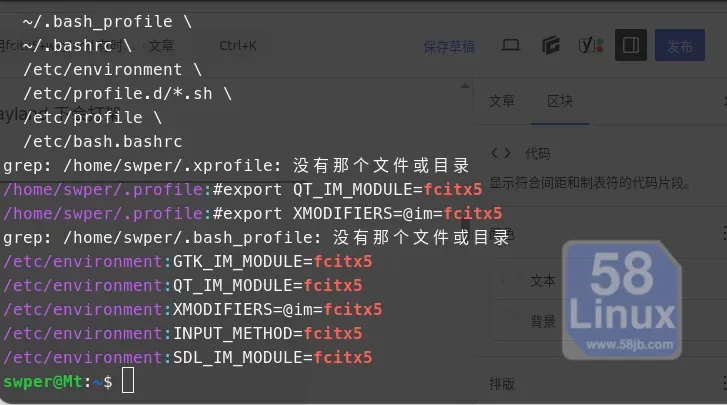
替换成下面这 4 行正确配置
export XMODIFIERS=@im=fcitx
export QT_IM_MODULE=fcitx
export GTK_IM_MODULE=fcitx
export INPUT_METHOD=fcitx
保存关闭。
一、先明确:fcitx4 vs fcitx5 关系
- fcitx = fcitx4:旧版框架,包名
fcitx。 - fcitx5:完全重写的新一代,包名
fcitx5,和 fcitx4 冲突、不能共存。 - 所以:它们是两个独立软件,你现在用的是 fcitx5,不是 fcitx4。
二、关键:为什么 fcitx5 环境变量要写 fcitx?
因为 XIM/GTK/QT 的输入法模块名固定叫 fcitx,不叫 fcitx5。
fcitx5 为了兼容旧程序,自己注册的模块名 / IM 名字仍然是 fcitx:
- XMODIFIERS=@im=fcitx
- GTK_IM_MODULE=fcitx
- QT_IM_MODULE=fcitx
- INPUT_METHOD=fcitx
2. 强制关闭并禁用 ibus(如果有的,不然后面必乱)
如果你不是使用Fcitx5框架的,就不用看这文章了。
systemctl --user stop ibus
systemctl --user disable ibus
gsettings set org.gnome.settings-daemon.plugins.xinput enabled false
3. 修复桌面会话全局环境(Wayland 必须)
怎么知道配置写一键搜索所有文件里的 fcitx5(重点)
sudo vim /etc/environment写入:
GTK_IM_MODULE=fcitx
QT_IM_MODULE=fcitx
XMODIFIERS=@im=fcitx
INPUT_METHOD=fcitx
SDL_IM_MODULE=fcitx
4. 安装缺失的 fcitx5 兼容模块(修复 Qt/GTK)
sudo apt update
sudo apt install -y fcitx5 fcitx5-configtool fcitx5-module-cloudpinyin fcitx5-module-chttrans fcitx5-frontend-gtk2 fcitx5-frontend-gtk3 fcitx5-frontend-gtk4 fcitx5-frontend-qt5 fcitx5-frontend-qt6
5. 重启系统(必须!)
reboot
6、重启后验证是否修复
重启后打开终端,执行:
fcitx5-diagnose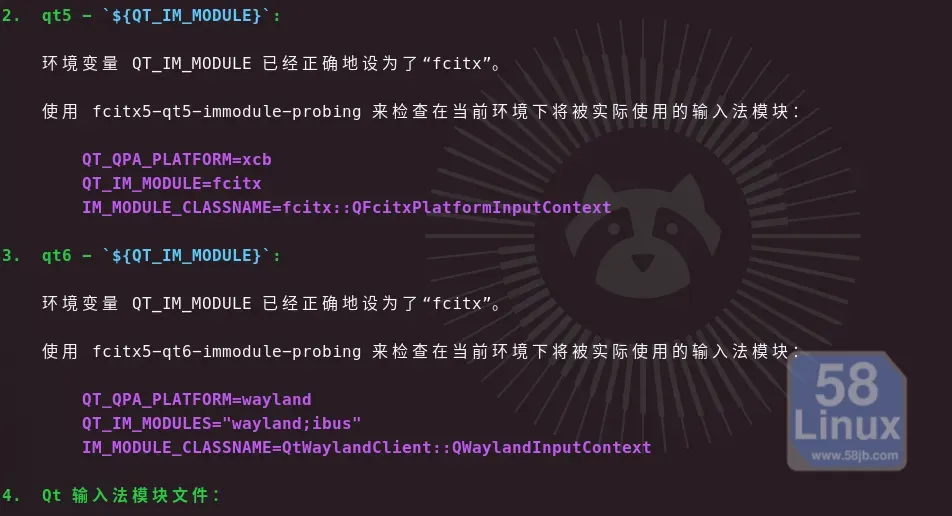
三、查看日志:定位崩溃 / 卡死时间点
1. 系统日志(systemd)
journalctl --user-unit=fcitx5.service -n 100 --no-pager | grep -iE "error|fail|crash|abort"
常见错误:
Failed to connect to wayland display→ Wayland 连接断了DBus timeout→ 总线卡死segmentation fault→ fcitx5 自身崩溃
2. Fcitx5 详细日志(最有用)
正常情况下不开debug日志的,所以想查看可以结束fcitx5进程后,再执行以下命令启动一个窗口查看。
# 新建日志目录
mkdir -p ~/.local/share/fcitx5/log

# 前台调试运行,复现不稳定时看输出
fcitx5 -d --log-level=DEBUG 2>&1 | tee ~/.local/share/fcitx5/log/debug.log
复现问题后,看日志关键词:
Load module: wayland→ Wayland 模块是否成功加载RegisterInputMethod→ 输入法引擎是否注册text-input-v3/zwp_input_method_v2→ 协议是否协商成功No input panel found→ GNOME 没暴露输入法面板接口
3. 查看历史日志
ls -l ~/.local/share/fcitx5/log/
cat ~/.local/share/fcitx5/log/xxxx.log
四、检测 Wayland 协议支持(GNOME 核心问题)
1. 安装检测工具
sudo apt install wayland-utils2. 查看 compositor 支持的协议
wayland-info | grep -i input
必须看到类似:
zwp_text_input_manager_v3text-input-v2/v3Fcitx
Ubuntu 26.04 GNOME Wayland 默认是支持的,但偶尔会:
- 升级后协议丢失
- 某些扩展 / 桌面 tweak 屏蔽了接口
五、排查冲突:ibus、其他输入法、GNOME 设置
1. 检查 ibus 是否在运行
ps aux | grep ibus
如果有 ibus-daemon,必须关掉:
systemctl --user stop ibus
systemctl --user disable ibus
ibus 和 fcitx5 在 Wayland 下 DBus 冲突,是不稳定主因之一。
2. 检查 GNOME 是否接管输入法
gsettings get org.gnome.settings-daemon.plugins.xinput enabled
# 返回 true → GNOME 会抢输入法,要关掉
gsettings set org.gnome.settings-daemon.plugins.xinput enabled false
六、分应用测试:判断是全局还是特定软件问题
依次在以下应用测试:
- GNOME 文本编辑器(GTK4,原生 Wayland)
- Firefox(Wayland 模式)
- VS Code(Electron,需加 Wayland 参数)
- 终端(gnome-terminal / konsole)
VS Code Wayland 启动参数
code --enable-features=UseOzonePlatform --ozone-platform=wayland --enable-wayland-ime
- 所有应用都不稳:问题在 fcitx5 + Wayland 全局集成
- 仅 Chrome/VS Code 不稳:应用自身 Wayland 实现 bug(常见)
- 仅 GTK 应用闪烁:大概率是 GTK_IM_MODULE 全局设置错误Fcitx
七、典型不稳定场景与对应检测点
表格
| 现象 | 最可能原因 | 检测点 | |
|---|---|---|---|
| 输入法突然消失、图标没了 | fcitx5 崩溃 / Wayland 连接断 | journalctl + fcitx5 debug 日志 | |
| 候选框闪烁、错位、卡死 | GTK_IM_MODULE 全局设置 / HiDPI | env | grep IM_MODULE,日志里 text-input-v3 |
| 切换中英文无响应 | DBus 阻塞 / 快捷键冲突 | fcitx5-remote,dbus-send 测试 | |
| 开机正常,用一会儿就卡 | 内存泄漏 /swap 问题 | free -h,日志持续增长 | |
| 某些软件能输、某些不能 | 应用未支持 Wayland IME | weston-info,应用启动参数 |
八、可以先执行的 “快速排查命令”
直接复制到终端一次性跑:
echo "=== Session Type ==="
echo $XDG_SESSION_TYPE

echo -e "\n=== Fcitx5 Process ==="
ps aux | grep fcitx5 | grep -v grep

echo -e "\n=== Fcitx5 Remote ==="
fcitx5-remote -c; echo "Return: $?"

echo -e "\n=== Env IM ==="
env | grep -E "IM_MODULE|XMODIFIERS"

echo -e "\n=== IBus Running? ==="
ps aux | grep ibus | grep -v grep

echo -e "\n=== Fcitx5 Diagnose ==="
fcitx5-diagnose | head -50
总结:
要找到问题所在,就要有迹可寻,通过日志,分析进程,及配置文件寻找问题的根源,在这一切皆是文件的系统中,可以大胆去搞,大不了恢复一下咯(前提你有做过快照备份)。