在 Linux 上使用 Windows 软件,最经典的场景之一就是练习打字。金山打字通作为国内最常用的打字练习软件,没有原生 Linux 版,但我们可以通过 Wine 运行,并进一步打包成标准 deb,实现一键安装、菜单图标、关联启动,完全融入系统。
spark-typeeasy_1.0_i386.deb这个包是 Deepin-Wine 封装的金山打字通,原本是 i386,我们要把它改成 amd64 /all 架构,让 64 位 Ubuntu 能直接安装运行。找了很久的,它是基于2008版(好旧)打包的,我只要它能打字练习,游戏那块不需要。
一、环境准备(打包工具 + Wine)
sudo apt update
sudo apt install \
  build-essential dpkg-dev devscripts debhelper dh-make fakeroot \
  wine wine32 wine64 libwine fonts-wqy-zenhei -y
二、就地拆解旧 deb
#新建一个目录
mkdir tmpdeb
cd tmpdeb

# 解压deb内容
dpkg-deb -x ../spark-typeeasy_1.0_i386.deb rootfs

# 解压控制信息
dpkg-deb -e ../spark-typeeasy_1.0_i386.deb rootfs/DEBIAN
当前目录结构:
swper@Mt:~/Downloads/tmpdeb$ tree -L 3 rootfs
rootfs
├── DEBIAN
│   ├── control
│   ├── postinst
│   ├── postrm
│   ├── preinst
│   └── prerm
├── opt
│   └── deepinwine
│       └── apps
└── usr
    └── share
        ├── applications
        └── icons

9 directories, 5 files
三、逐个编写配置文件
- 修改 DEBIAN/control 关键项
vim rootfs/DEBIAN/control

# 原来 Architecture: i386 → 二选一
# 方案A:amd64(推荐,适配64位系统)
Architecture: amd64

# 方案B:all(全架构通用,32/64Ubuntu都能装,最优)
# Architecture: all

#最终效果,去掉深度系统的依赖包,同时改成了amd64位,不再是i386的

Package: spark-typeeasy
Version: 1.0
Architecture: amd64
Depends: wine,fonts-wqy-zenhei,p7zip-full
Maintainer: Ubuntu Custom
Priority: optional
Section: utils
Description: Kingsoft TypeEasy 2008
金山打字通,运行在 Ubuntu 原生 Wine 环境中,无深度依赖.- DEBIAN/postinst安装脚本内容
#!/bin/bash

PACK_NAME="Spark-typeeasy"
BOTTLE_NAME="Spark-typeeasy"
ACTIVEX_NAME=""
MAKE_AUTOSTART=""
SEND_TO_DESKTOP=""

make_autostart()
{
    for file in $(ls /home)
    do
        if [ -d "/home/$file/.config/autostart" ]
        then
            cp /usr/share/applications/${PACK_NAME}.desktop /home/$file/.config/autostart/
            sed -i "s#%u#\"autostart\"#" /home/$file/.config/autostart/${PACK_NAME}.desktop
        fi
    done
}

send_to_desktop()
{
    for file in $(ls /home)
    do
        if [ -d "/home/$file/.config" ]
        then
            desktop=$(cat /etc/xdg/user-dirs.defaults | grep DESKTOP | awk -F= '{print $2}')
            if [ -d "/home/$file/$desktop" ]; then
                cp /usr/share/applications/${PACK_NAME}*.desktop /home/$file/$desktop
            fi
        fi
    done
}

# ===================== 增加:自动解压 files.7z =====================

extract_app()
{
    APP_DIR="/opt/deepinwine/apps/${PACK_NAME}"
    ZIP_FILE="${APP_DIR}/files.7z"

    if [ -f "${ZIP_FILE}" ] && [ ! -d "${APP_DIR}/drive_c" ]; then
        7z x -y "${ZIP_FILE}" -o"${APP_DIR}" > /dev/null 2>&1
        # 解压完可以删除压缩包,节省空间
        rm -f "${ZIP_FILE}"
    fi
}

# 执行解压
extract_app

# ===================== 增加结束 =====================

if [ -n "$MAKE_AUTOSTART" ]; then
    make_autostart
fi

if [ -n "$SEND_TO_DESKTOP" ]; then
    send_to_desktop
fi

if [ -n "$ACTIVEX_NAME" ]; then
    if [ ! -d "/usr/lib/mozilla/plugins" ];then
        mkdir -p /usr/lib/mozilla/plugins
    fi
    cp /usr/local/share/pipelight/libpipelook.so /usr/lib/mozilla/plugins/libpipelook-${ACTIVEX_NAME}.so
fi

true- DEBIAN/postrm脚本内容
#!/bin/sh

PACK_NAME="Spark-typeeasy"
BOTTLE_NAME="Spark-typeeasy"
ACTIVEX_NAME=""
MAKE_AUTOSTART=""
SEND_TO_DESKTOP=""

make_autostart()
{
    for file in $(ls /home)
    do
        if [ -d "/home/$file/.config/autostart" ]
        then
            rm /home/$file/.config/autostart/${PACK_NAME}.desktop
        fi
    done
}

send_to_desktop()
{
    for file in $(ls /home)
    do
        if [ -d "/home/$file/.config/autostart" ]
        then
            desktop=$(cat /etc/xdg/user-dirs.defaults | grep DESKTOP | awk -F= '{print $2}')
            if [ -d "/home/$file/$desktop" ]; then
                rm /home/$file/$desktop/${PACK_NAME}*.desktop
            fi
        fi
    done
}

if [ -n "$MAKE_AUTOSTART" ]; then
    make_autostart
fi

if [ -n "$SEND_TO_DESKTOP" ]; then
    send_to_desktop
fi

if [ -n "$ACTIVEX_NAME" ]; then
    rm /usr/lib/mozilla/plugins/libpipelight-${ACTIVEX_NAME}.so
fi

# Make sure the script returns 0
true- DEBIAN/prerm(卸载脚本),我直接删除安装目录/opt/deepinwine
#!/bin/bash

PACK_NAME="Spark-typeeasy"
APP_DIR="/opt/deepinwine/apps/${PACK_NAME}"

# 卸载清理 drive_c
rm -rf "${APP_DIR}"

true- 程序的启动脚本:rootfs/opt/deepinwine/apps/Spark-typeeasy/run.sh
#!/bin/bash
export WINEARCH=win32
export WINEPREFIX="$HOME/.spark-typeeasy"

APP_BASE="/opt/deepinwine/apps/Spark-typeeasy"
EXE="$APP_BASE/drive_c/Program Files/Kingsoft/TypeEasy/TypeEasy 2008/TypeEasy.exe"
DATA_DIR="$APP_BASE/drive_c/Program Files/Kingsoft/TypeEasy"

SRC_SYS32="$APP_BASE/drive_c/windows/system32"
SRC_FONT="$APP_BASE/fonts/simsun.ttc"

DEST_SYS32="$WINEPREFIX/drive_c/windows/system32"
DEST_FONTS="$WINEPREFIX/drive_c/windows/Fonts"

# ==============================
# 自动给数据目录加写入权限(需要sudo,这一步是添加新用户有权限保存数据)
# ==============================
sudo chmod -R 777 "$DATA_DIR" >/dev/null 2>&1

# ==============================
# 首次初始化:字体 + 运行库
# ==============================
if [ ! -d "$WINEPREFIX" ]; then
    mkdir -p "$DEST_SYS32" "$DEST_FONTS"

    # 复制运行库
    cp -n "$SRC_SYS32"/mfc42*.dll "$DEST_SYS32/"
    cp -n "$SRC_SYS32"/riched20.dll "$DEST_SYS32/"
    cp -n "$SRC_SYS32"/comctl32.dll "$DEST_SYS32/"

    # 复制中文字体
    cp -n "$SRC_FONT" "$DEST_FONTS/"

    winecfg /v win7 >/dev/null 2>&1

    # 导入字体注册表
    echo 'REGEDIT4
[HKEY_LOCAL_MACHINE\Software\Microsoft\Windows NT\CurrentVersion\FontSubstitutes]
"Arial"="SimSun"
"Tahoma"="SimSun"
"MS Shell Dlg"="SimSun"
"MS Shell Dlg 2"="SimSun"
' | wine regedit -
fi

# 屏蔽报错
export WINEDLLOVERRIDES="mscoree,mshtml="

# 启动
LC_ALL=zh_CN.UTF-8 wine "$EXE" "$@"
cat: pwd: No such file or directory- 桌面快捷方式rootfs/opt/deepinwine/apps/Spark-typeeasy.desktop
[Desktop Entry]
Type=Application
Name=金山打字通
Name[zh_CN]=金山打字通
Exec=/opt/deepinwine/apps/Spark-typeeasy/run.sh
Icon=system-run
Terminal=false
Categories=Utility;Education;
StartupWMClass=TypeEasy.exe
Comment=Kingsoft TypeEasy 2008- 添加一个字体,解决应用打开时窗口中文乱码
mkdir -p rootfs/opt/deepinwine/apps/Spark-typeeasy/fonts
#找一个simsun.ttc 字体并复制到刚创建目录下
cp simsun.ttc rootfs/opt/deepinwine/apps/Spark-typeeasy/fonts/

#这一步作用是为了让上面的run.sh脚本启程程序时初始化一个wine环境,再把字体复制到环境目录中,从而解决中文乱码问题。
至此基本配置完成,最后的目录结构及文件:
swper@Mt:~/Downloads/tmpdeb/rootfs$ tree
.
├── DEBIAN
│   ├── control
│   ├── postinst
│   ├── postrm
│   ├── preinst
│   └── prerm
├── opt
│   └── deepinwine
│       └── apps
│           └── Spark-typeeasy
│               ├── files.7z
│               ├── fonts
│               │   └── simsun.ttc
│               ├── run.sh
│               └── Spark-typeeasy.desktop
└── usr
    └── share
        ├── applications
        │   └── Spark-typeeasy.desktop
        └── icons
            └── hicolor
                ├── 128x128
                │   └── apps
                │       └── Spark-typeeasy.png
                ├── 16x16
                │   └── apps
                │       └── Spark-typeeasy.png
                ├── 32x32
                │   └── apps
                │       └── Spark-typeeasy.png
                ├── 48x48
                │   └── apps
                │       └── Spark-typeeasy.png
                └── 64x64
                    └── apps
                        └── Spark-typeeasy.png

22 directories, 15 files
四、正式打包
- 会有几个提示,那个不影响的。
dpkg-deb -b rootfs spark-typeeasy_1.0_amd64.deb- 按这方法打包后+字体和依赖库大概108M, 比原来的大了12M这样。
五、安装测试使用
deb包虽然打好了,但是系统本身需要的环境还是要自己手动安装一下基础的wine环境。
安装到Ubuntu26.04中:
swper@Mt:~/Downloads/tmpdeb$ ls -lh
total 108M
drwxr-xr-x 6 swper swper 4.0K Jun  7 08:33 rootfs
drwxr-xr-x 5 swper swper 4.0K Jun  7 08:33 rootfs_clean
-rw-r--r-- 1 swper swper 108M Jun  7 15:13 spark-typeeasy_1.0_amd64.deb
swper@Mt:~/Downloads/tmpdeb$ sudo dpkg -i spark-typeeasy_1.0_amd64.deb
正在选中未选择的软件包 spark-typeeasy。
(正在读取数据库 ... 系统当前共安装有 507766 个文件和目录。)
准备解压 spark-typeeasy_1.0_amd64.deb  ...
正在解压 spark-typeeasy (1.0) ...
正在设置 spark-typeeasy (1.0) ...
正在处理用于 desktop-file-utils (0.28-1build1) 的触发器 ...
正在处理用于 gnome-menus (3.38.1-1ubuntu1) 的触发器 ...
正在处理用于 hicolor-icon-theme (0.18-2build1) 的触发器 ...
可以看到安装跟平常的安装包一样,处理得非常标准了。
卸载也非常的方便:
swper@Mt:~/Downloads/tmpdeb$ sudo apt remove spark-typeeasy
下列软件包是自动安装的并且现在不需要了:
  gtk2-engines
使用'sudo apt autoremove'来卸载它(它们)。

【将要卸载】:
  spark-typeeasy

摘要:
  升级:0,安装:0,卸载:1,不升级:139
  所需的空间:0 B / 645 GB 可用

是否继续? [Y/n] y
(正在读取数据库 ... 系统当前共安装有 507780 个文件和目录。)
正在卸载 spark-typeeasy (1.0) ...
正在处理用于 hicolor-icon-theme (0.18-2build1) 的触发器 ...
正在处理用于 gnome-menus (3.38.1-1ubuntu1) 的触发器 ...
正在处理用于 desktop-file-utils (0.28-1build1) 的触发器 ...
启动测试一下:
安装完后第一次会初始化一个当用户目录下的:~/.spark-typeeasy/目录,它方便单独一个wine配置空间,不影响系统全局。
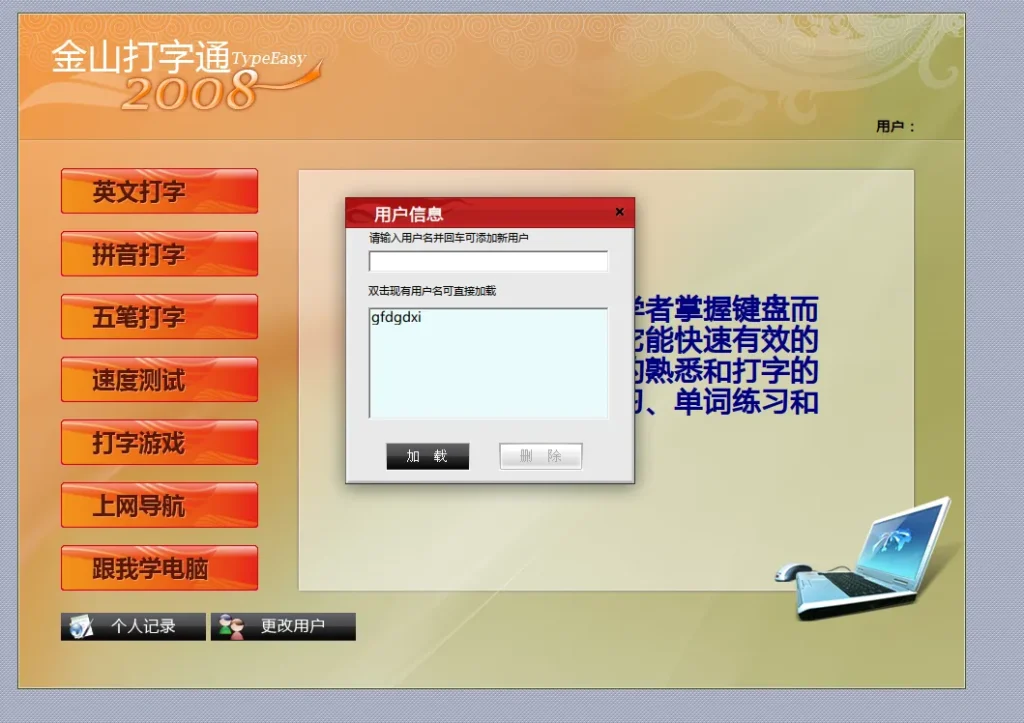
就是拼音打字时有一个按空格会出得异常,然后就是下边的打字游戏,上网导航,跟我学电脑等都不用使用,因为它的链接已经失效了。
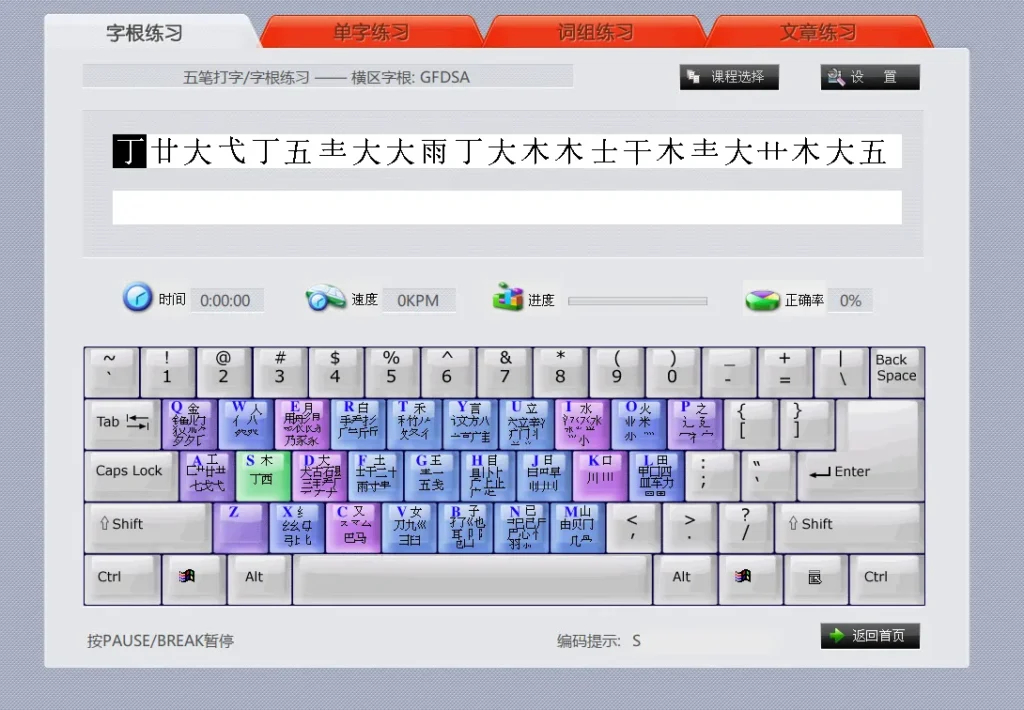
如果你也是用五笔打字的,也想用这个软件练习打打字,不妨自己也打包一个试试哦。