GeneratePress 是一款轻量高效的 WordPress 主题,结构非常规范,不建议直接改父主题 single.php,推荐用子主题 + 钩子(Hook)方式添加,安全、不丢失修改、升级主题也不受影响。
下面是专门针对 GeneratePress 最标准、最稳妥的教程,可直接复制。
很多使用 GeneratePress 的朋友都想在文章末尾加一个「随机推荐文章」模块,既能丰富页面内容,又能增加内链、提升用户停留时间。GeneratePress 本身没有内置随机文章功能,但我们可以用它强大的钩子(Hook) 轻松实现,不用改主题核心文件,安全可靠。
实现思路
- 使用 GeneratePress 自带钩子:
generate_after_content - 只在 文章页 显示
- 排除当前文章,避免重复
- 自带简单样式,不破坏主题风格
使用方法(GeneratePress 通用)
- 进入 WordPress 后台 → 外观 → 主题文件编辑器
- 打开子主题的
functions.php(强烈建议用子主题,避免升级丢失) - 把上面的代码粘贴到文件最底部
- 保存后,刷新任意文章页,就能看到和示例一样的两列卡片效果
进入:外观 → 主题编辑器 → 找到 functions.php文件
粘贴下面代码:
// GeneratePress 文章页底部添加两列卡片式随机文章(纯文字)
add_action( 'generate_after_content', 'gp_add_two_column_random_posts' );
function gp_add_two_column_random_posts() {
    if ( ! is_single() ) return;

    $args = array(
        'posts_per_page' => 4,
        'orderby'        => 'rand',
        'post_status'    => 'publish',
        'post__not_in'   => array( get_the_ID() ),
        'ignore_sticky_posts' => true,
    );

    $random_query = new WP_Query( $args );
    if ( ! $random_query->have_posts() ) return;
?>

<style>
.gp-related-wrap {
    margin-top: 40px;
}
.gp-related-title {
    font-size: 18px;
    font-weight: 600;
    margin-bottom: 20px;
    color: #222;
}
.gp-related-grid {
    display: grid;
    grid-template-columns: repeat(auto-fit, minmax(48%, 1fr));
    gap: 20px;
}
.gp-related-card {
    background: #f8f9fa;
    padding: 25px;
    border-radius: 8px;
}
.gp-related-category {
    color: #2ecc71; /* 绿色标签 */
    font-size: 16px;
    font-weight: 600;
    text-transform: uppercase;
    margin-bottom: 15px;
    display: block;
}
.gp-related-title-text {
    font-size: 16px;
    line-height: 1.4;
    color: #222;
    text-decoration: none;
}
.gp-related-title-text:hover {
    color: #007bff;
}
</style>

<div class="gp-related-wrap">
    <h3 class="gp-related-title">RELATED ARTICLES</h3>
    <div class="gp-related-grid">
        <?php while ( $random_query->have_posts() ) : $random_query->the_post(); ?>
            <div class="gp-related-card">
                <?php
                // 获取文章的第一个分类
                $categories = get_the_category();
                if ( ! empty( $categories ) ) {
                    echo '<span class="gp-related-category">' . esc_html( $categories[0]->name ) . '</span>';
                }
                ?>
                <a href="<?php the_permalink(); ?>" class="gp-related-title-text">
                    <?php the_title(); ?>
                </a>
            </div>
        <?php endwhile; ?>
    </div>
</div>

<?php
    wp_reset_postdata();
}
效果说明与自定义
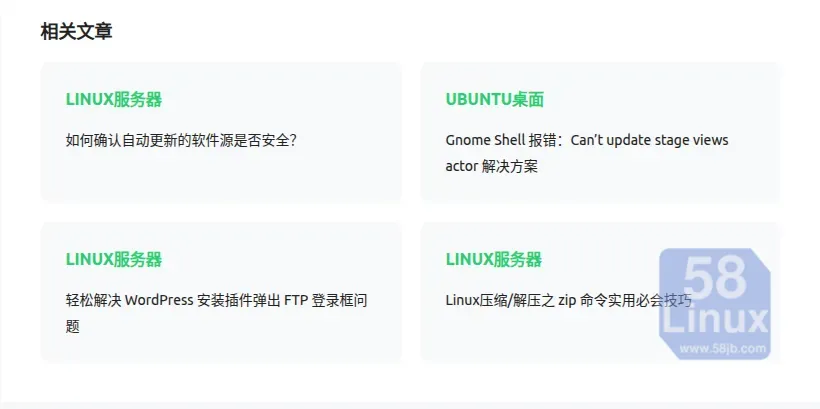
- 布局:响应式两列,小屏幕自动变成一列
- 样式:绿色分类标签 + 浅色卡片背景
- 可直接修改的部分:
posts_per_page => 4:修改显示的文章数量(4/6/8 都可以,保持偶数)color: #2ecc71:修改分类标签的颜色background: #f8f9fa:修改卡片背景色padding: 25px:修改卡片内边距font-size: 16px:修改标题大小